IndexCase 03
Reconstruct The Useless Fund desktop pastiche from frozen evidence
useless-fund · frozen-evidence · medium · pilot · LIVE · captured 2026-08-18 · research-only
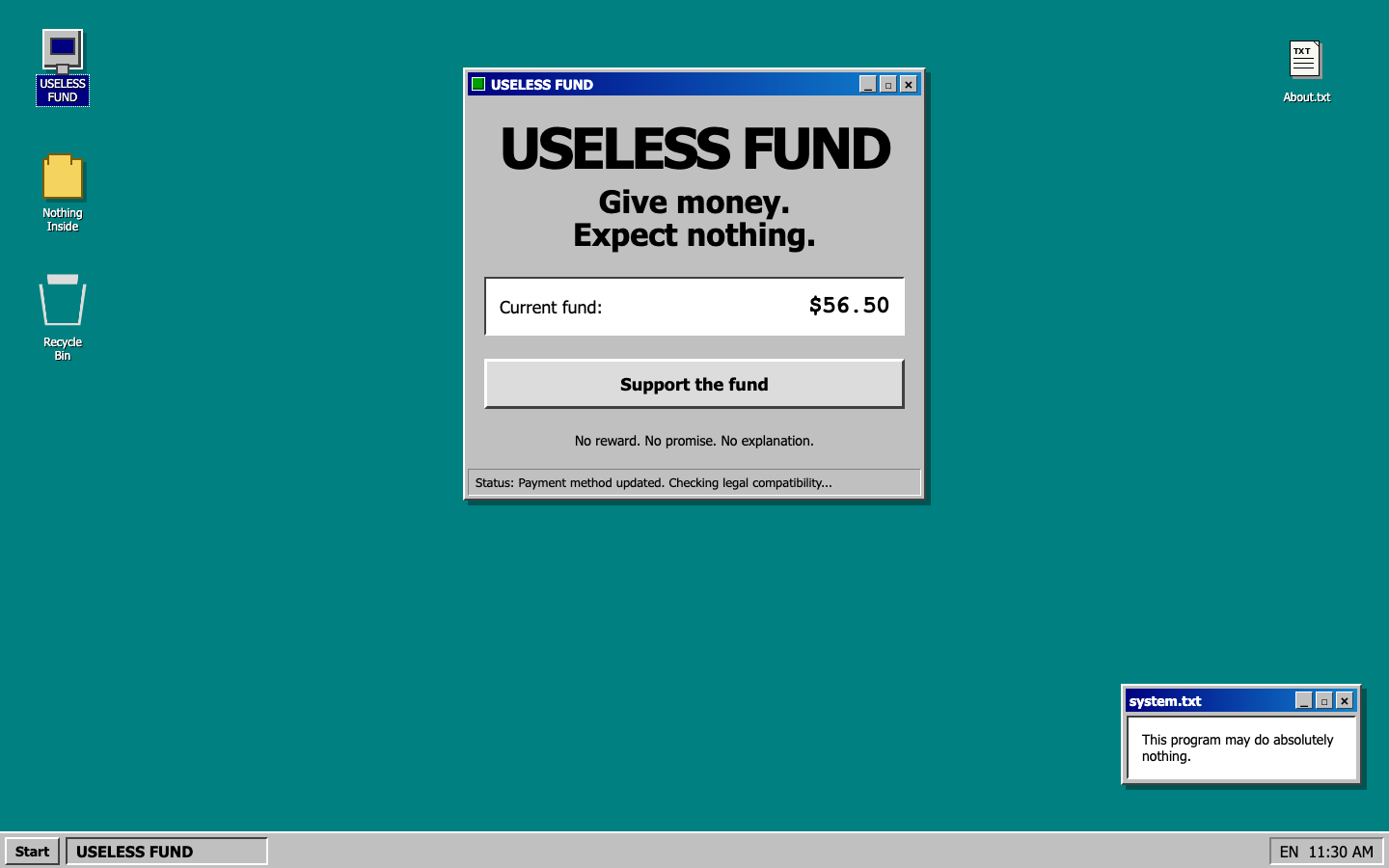
research-only. The reference captures on this page are derived from third-party media held under a research boundary. They are published so results can be checked, and must not be redistributed or reused as source assets.
Findings
This bundle contains the case definition but no attempts yet. The dossier is still the whole public contract: provenance, evaluation matrix, brief and prompts below.
Provenance
How the case was traced from a discovery link to an authoritative ground truth.
- 01discovery onepagelove.com
- 02original-post onepagelove.com
- 03live uselessfund.com
- 04reference-capture
Frozen evidence (2)
Evaluation matrix
Deterministic. No vision-model judge.
Score composition
Install and build are gates, not weighted components — a failed build scores zero. Raw visual similarity at or below the case floor of 0.12 earns no credit; the remainder is linearly normalized, then weighted 75% visual / 25% functional.
normalized_visual = max(0, (visual - 0.12) / 0.88)
overall = 0.75 * normalized_visual + 0.25 * functional
Visual checkpoints (5)
Deterministic checks (8, total weight 7.0)
| Check | Kind | Target | Weight |
|---|---|---|---|
| primary-heading | text | desktop | 1.0 |
| fund-fixture | text | desktop | 1.0 |
| status-fixture | text | desktop | 0.5 |
| clock-fixture | text | desktop | 0.5 |
| recycle-opens-message | click_text_change | desktop | 1.5 |
| start-opens-message | click_text_change | desktop | 1.0 |
| about-window-opens | click_text_change | desktop | 1.0 |
| donate-link-inert | selector | desktop | 0.5 |
Check selectors and thresholds are sealed. Only the identifier, kind, target and weight are published.
Reproduce
Everything a candidate sees is public. The oracle references, grader code and thresholds are not.
skills injected design-case-implementer
1 · Get the workspace
npx degit dairui1/reconbench/cases/useless-fund/task useless-fund-task
Pulls only cases/useless-fund/task/ — the public brief, permitted evidence and the starter codebase.
2 · Copy the prompt
Runtime-agnostic. Paste into any coding agent. Skill files are referenced conditionally so the prompt still makes sense without them.
Use the ReconBench candidate skills `design-case-implementer` in that order. Read those skill files if your workspace provides them, and otherwise follow the same process with your own tools.

You are the candidate in ReconBench task `useless-fund` (Reconstruct The Useless Fund desktop pastiche from frozen evidence).

Read `task/brief.md` and every other file under `task/` before changing code.
Implement the result only under `submission/`. The starter may be replaced when the task allows it.
Do not inspect parent directories, benchmark harness files, grader code, reference images, or any oracle material.
Do not call write endpoints belonging to a reference site. Keep forms, counters, and similar behavior local.

Before finishing:
1. Run the requested build command.
2. Start the app and check every target viewport in the task.
3. Exercise the required interactions and inspect browser console errors.
4. Write `submission/submission.json` using the contract in the implementer skill.

The harness will evaluate the filesystem after this process exits. Do not leave a dev server running.
As rendered by the harness for the Codex CLI, including injected skill references.
Use $design-case-implementer.

You are the candidate in ReconBench task `useless-fund` (Reconstruct The Useless Fund desktop pastiche from frozen evidence).

Read `task/brief.md` and every other file under `task/` before changing code.
Implement the result only under `submission/`. The starter may be replaced when the task allows it.
Do not inspect parent directories, benchmark harness files, grader code, reference images, or any oracle material.
Do not call write endpoints belonging to a reference site. Keep forms, counters, and similar behavior local.

Before finishing:
1. Run the requested build command.
2. Start the app and check every target viewport in the task.
3. Exercise the required interactions and inspect browser console errors.
4. Write `submission/submission.json` using the contract in the implementer skill.

The harness will evaluate the filesystem after this process exits. Do not leave a dev server running.
As rendered by the harness for Claude Code, including injected skill references.
/design-case-implementer

You are the candidate in ReconBench task `useless-fund` (Reconstruct The Useless Fund desktop pastiche from frozen evidence).

Read `task/brief.md` and every other file under `task/` before changing code.
Implement the result only under `submission/`. The starter may be replaced when the task allows it.
Do not inspect parent directories, benchmark harness files, grader code, reference images, or any oracle material.
Do not call write endpoints belonging to a reference site. Keep forms, counters, and similar behavior local.

Before finishing:
1. Run the requested build command.
2. Start the app and check every target viewport in the task.
3. Exercise the required interactions and inspect browser console errors.
4. Write `submission/submission.json` using the contract in the implementer skill.

The harness will evaluate the filesystem after this process exits. Do not leave a dev server running.
3 · Launch
uv run reconbench run \
  --task useless-fund \
  --agent codex/gpt-5.6-sol \
  --evaluate \
  --allow-untrusted-native

uv run reconbench run \
  --task useless-fund \
  --agent cc/sonnet \
  --evaluate \
  --allow-untrusted-native
cd useless-fund-task
codex --model gpt-5.6-sol
# then paste the "Codex" prompt above
cd useless-fund-task
claude --model sonnet
# then paste the "Claude Code" prompt above
Launch snippets are composed by this site from the case id and the agent selectors present in the bundle. They are a convenience, not a graded contract.
Appendix ATask brief — exactly what the candidate agent receives
The Useless Fund — desktop pastiche reconstruction
Build a high-fidelity, responsive, functional reconstruction in the existing
Vite/React starter under submission/. This is a frozen-evidence task: the
files under task/ are the complete permitted reference set. Do not browse or
fetch the live site, the gallery entry, or the project's API.
Frozen evidence
- Read
source-report.jsonandsource-notes.mdfor the source chain, the selected ground truth, the version comparison, and the rights boundary. - Use
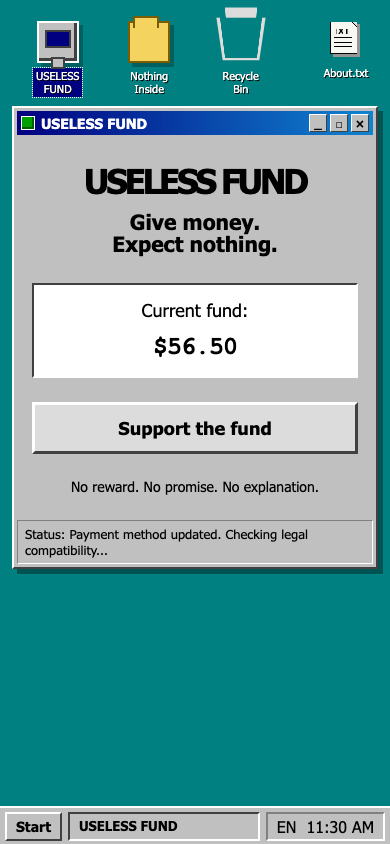
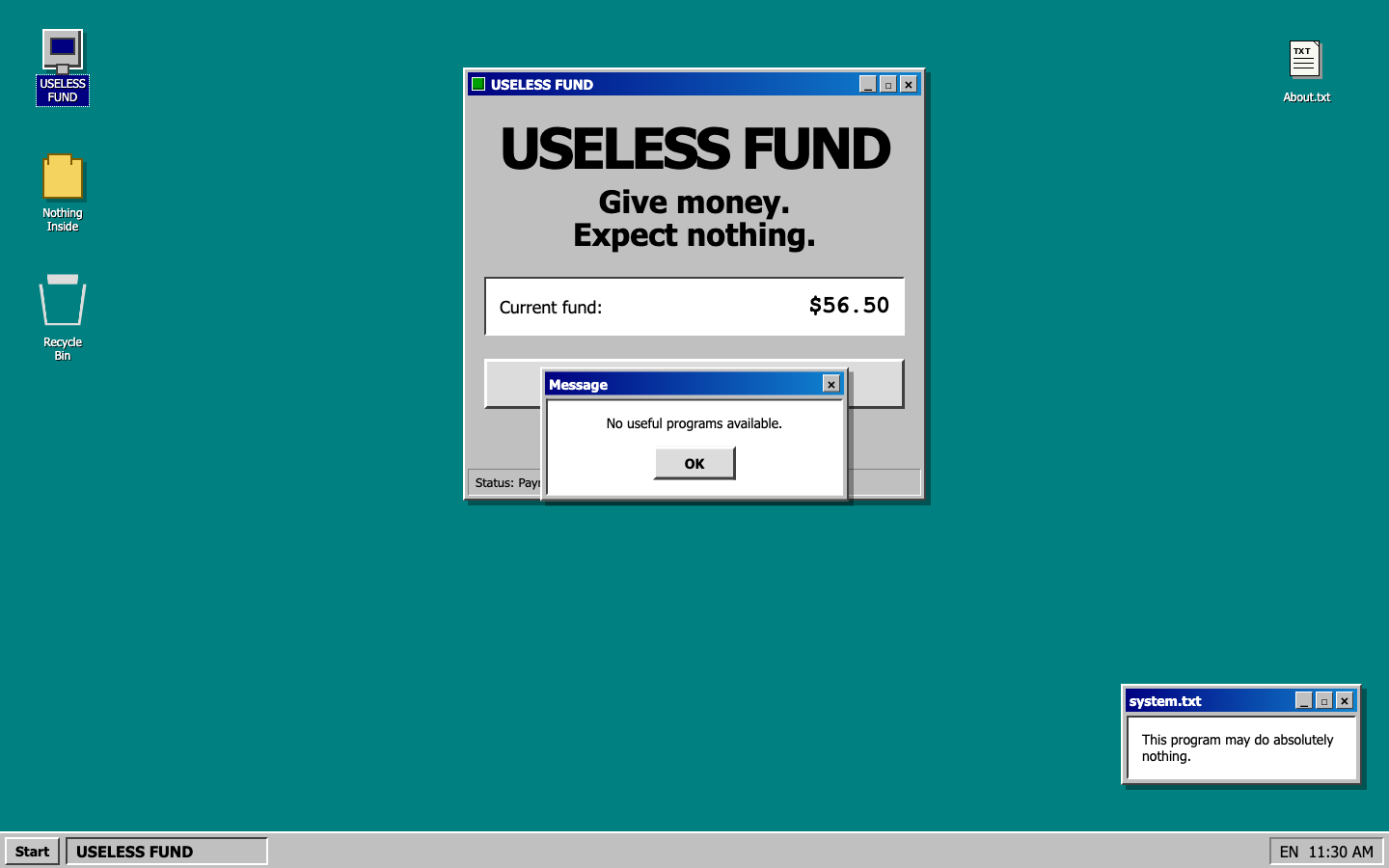
evidence/reference-desktop.pngandevidence/reference-mobile.pngas the complete-page visual references. They are direct captures of the frozen target at1440x900and390x844. evidence/acceptance.mdrecords the observed layout, behaviour, and interaction contract;evidence/case.jsonis the same contract in machine-readable form.evidence/research-log.mdrecords the authoring rationale.
What the page is
A single route (/) rendering a Windows 95 desktop pastiche. The document
height equals the viewport height at every target width — the page never
scrolls. Match desktop at 1440x900 and mobile at 390x844.
The desktop carries a column of icons on the left, an About.txt icon pinned
top-right, a centred main window, a small system.txt note window at the
bottom-right on desktop only, and a full-width taskbar.
Frozen fixture values
Three regions of the target are server- or clock-driven. Render these exact
strings as static values. Do not fetch them, do not animate them, and do not
recompute the clock from Date:
| Region | Frozen value |
|---|---|
| Fund amount | $56.50 |
| Status bar line | Status: Payment method updated. Checking legal compatibility... |
system.txt body |
This program may do absolutely nothing. |
| Taskbar tray clock | 11:30 AM |
Required behaviour
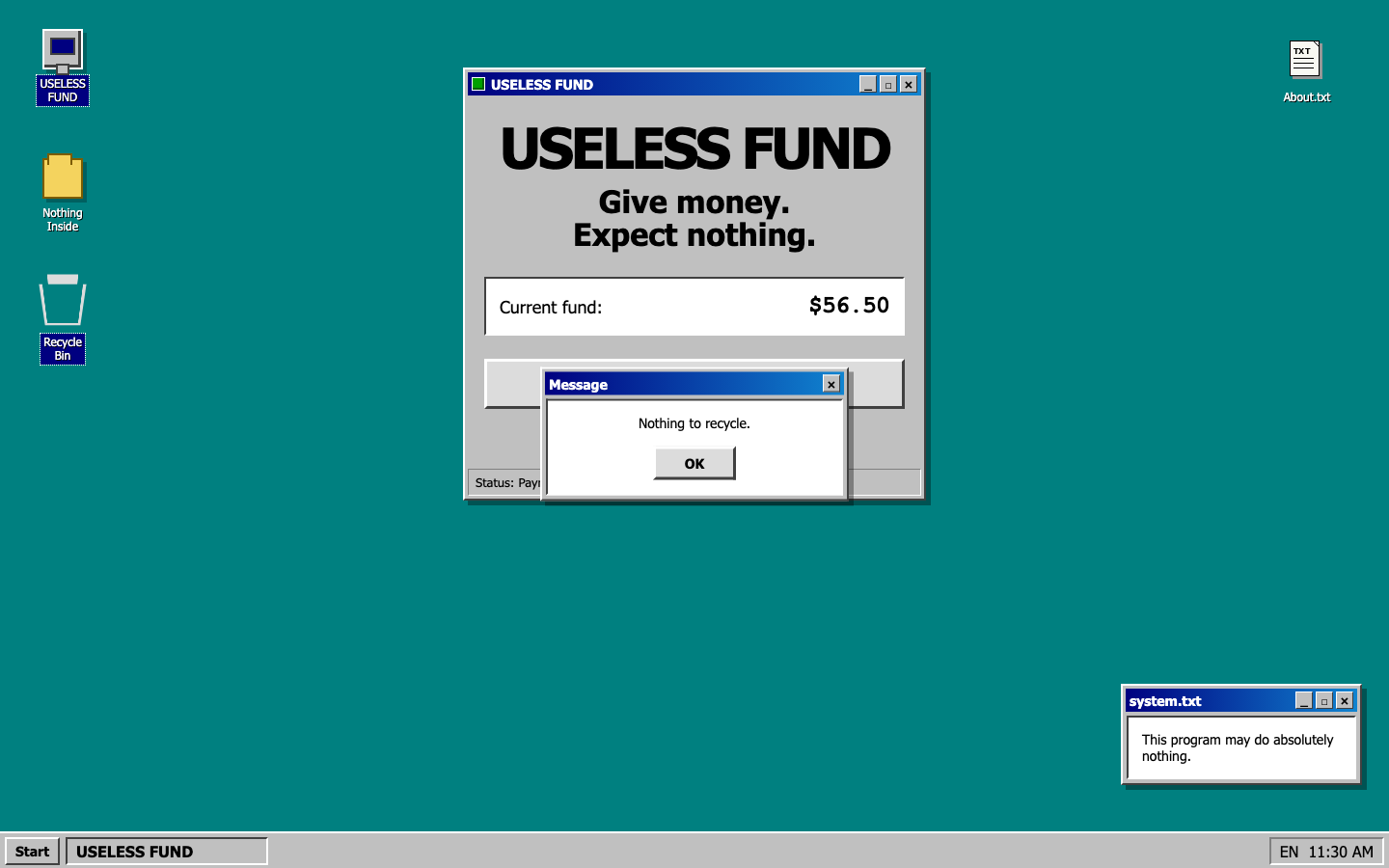
- Clicking the Nothing Inside icon opens a modal message window titled
MessagereadingNothing inside. - Clicking the Recycle Bin icon opens the same modal reading
Nothing to recycle. - Clicking Start opens the same modal reading
No useful programs available. - The modal has an
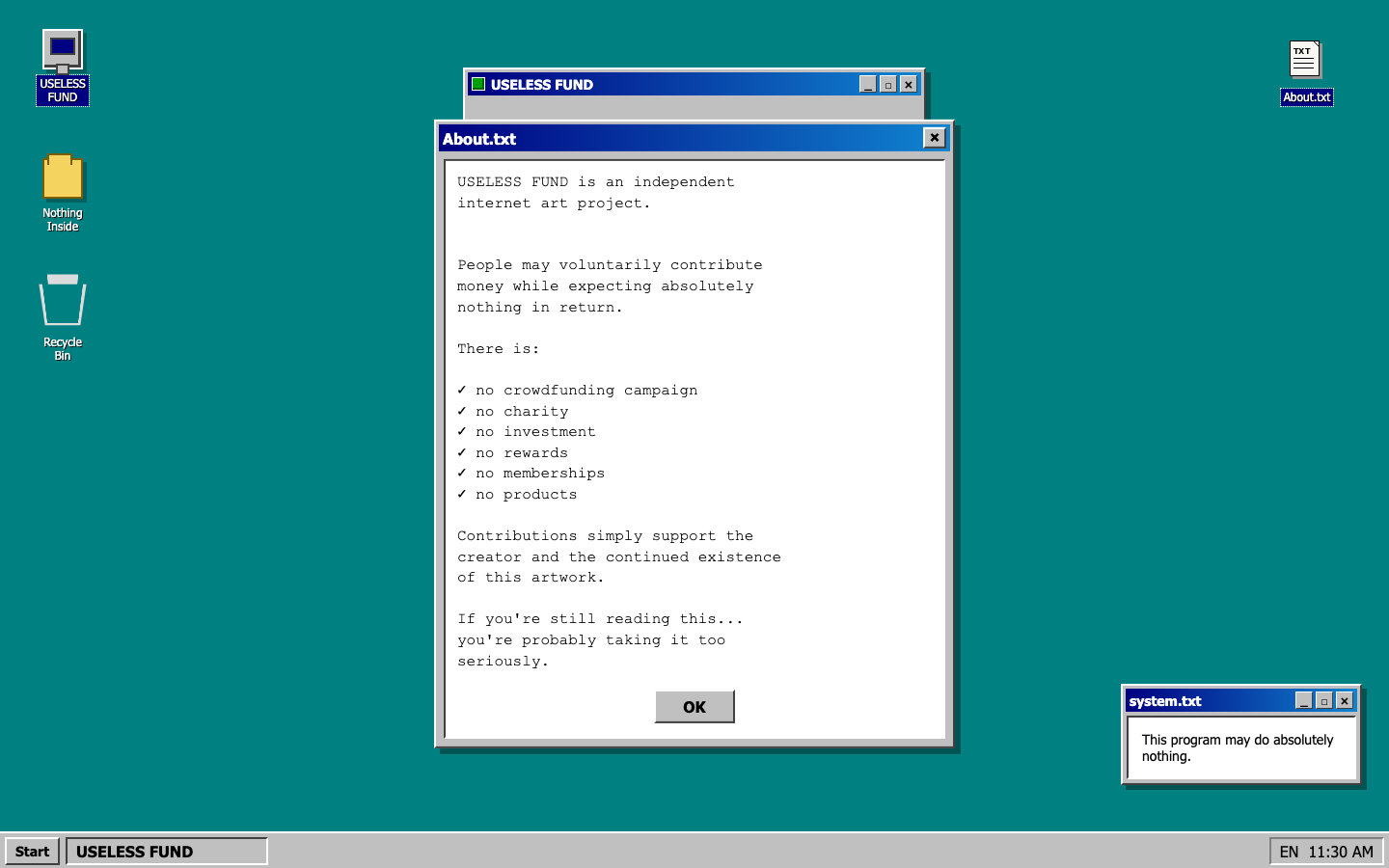
OKbutton and a title-bar close control; both dismiss it. - Clicking the About.txt icon opens a larger window with a monospace body,
an
OKbutton, and a close control; both dismiss it. - Support the fund is a link to the target's PayPal donate URL. It must remain a link and must never be submitted, prefetched, or auto-followed.
- Do not invent behaviour the target does not have: the
USELESS FUNDdesktop icon opens nothing, the main window's_ □ ×controls are decorative, the taskbar task item does nothing, and no window can be dragged.
Grading hooks
The evaluator drives the page through these selectors. Use whatever internal structure you like, but expose exactly these hooks:
| Hook | Meaning |
|---|---|
h1 |
the main window headline |
[data-fund] |
element whose text is the frozen fund amount |
[role="status"] |
the main window's status-bar line |
[data-clock] |
the taskbar tray clock |
[aria-label="Nothing Inside"] |
the Nothing Inside desktop icon control |
[aria-label="Recycle Bin"] |
the Recycle Bin desktop icon control |
[aria-label="Start"] |
the taskbar Start button |
[aria-label="About.txt"] |
the About.txt desktop icon control |
[role="alertdialog"] |
the modal message window |
[role="dialog"][aria-label="About.txt window"] |
the About.txt window |
The message window and the About.txt window must both exist in the DOM on load and be hidden until opened, so that their text can be read before and after a click. Interactive controls must be real buttons or links with accessible names.
Safety and rights
- Never call the project's configuration, fund, or donation endpoints. Every value on the page is local and static.
- The supplied captures are research-only evidence. Rebuild the window chrome,
desktop icons, and the
About.txtdocument glyph in CSS or inline SVG. Do not extract, trace, or embed bitmaps from the reference images. - Do not embed credentials or analytics.
- The result must remain a real webpage. Do not submit a screenshot, canvas capture, iframe, or mirrored copy of the original page as the implementation.
Completion contract
npm run build must succeed. The app must start with:
npm run dev -- --host 127.0.0.1 --port 4173
Before finishing, write submission/submission.json with the start command,
build command, implemented routes, evidence paths, known deviations, and
whether any research-only assets are present. The supplied source report and
notes are curator-owned inputs; do not reproduce them as submission outputs.